Introductory offer: 50% off for a limited time

Ends in

0 d
0 h
0 m
0 s

Visitor feedback

Get real feedback
from real users.

Switch it on and your live site gets a Feedback tab, in your colour. Visitors point at the problem, add a note or a screenshot and send it, with no account. It lands in Drobber marked Visitor, in purple, and only your team ever sees it.

14-day free trial · 30-day money-back guarantee

On a coffee brand’s live website, a visitor clicks the yellow Feedback tab, highlights the misspelt word dissapears, and writes in the feedback form that it should say disappears, with an email for a reply. They press Send and see a thank-you message. A purple Visitor pin marks the spot, and the feedback arrives in Drobber for the site’s team, labelled Visitor.FeedbackClick to pin, drag to box an area, or drag across text to highlight it.Click the page+Your feedbackFeedbackSomething’s brokenQuestionYour email, if you’d like a reply (optional)[email protected]What would you like to tell us?Typo here: “dissapears” should be“disappears”.SendFeedback by Drobber1Thank you! Your feedback has been sent.NEW IN DROBBERjust nowVVisitorVisitorTypo here: “dissapears” should be “disappears”.Aurelo website · The ritual · [email protected]aurelo.com

After launch

“Something’s wrong
on the checkout page.”

Once a site goes live, the feedback that matters most comes from the people using it. It usually arrives as a vague email to the client, a message on social media, or not at all.

With visitor feedback, anyone using the site can point at the exact spot and say what’s wrong. You get the page, the element, the browser and the device with every note, in the same place as your review comments, without letting visitors see anything else.

Try it out
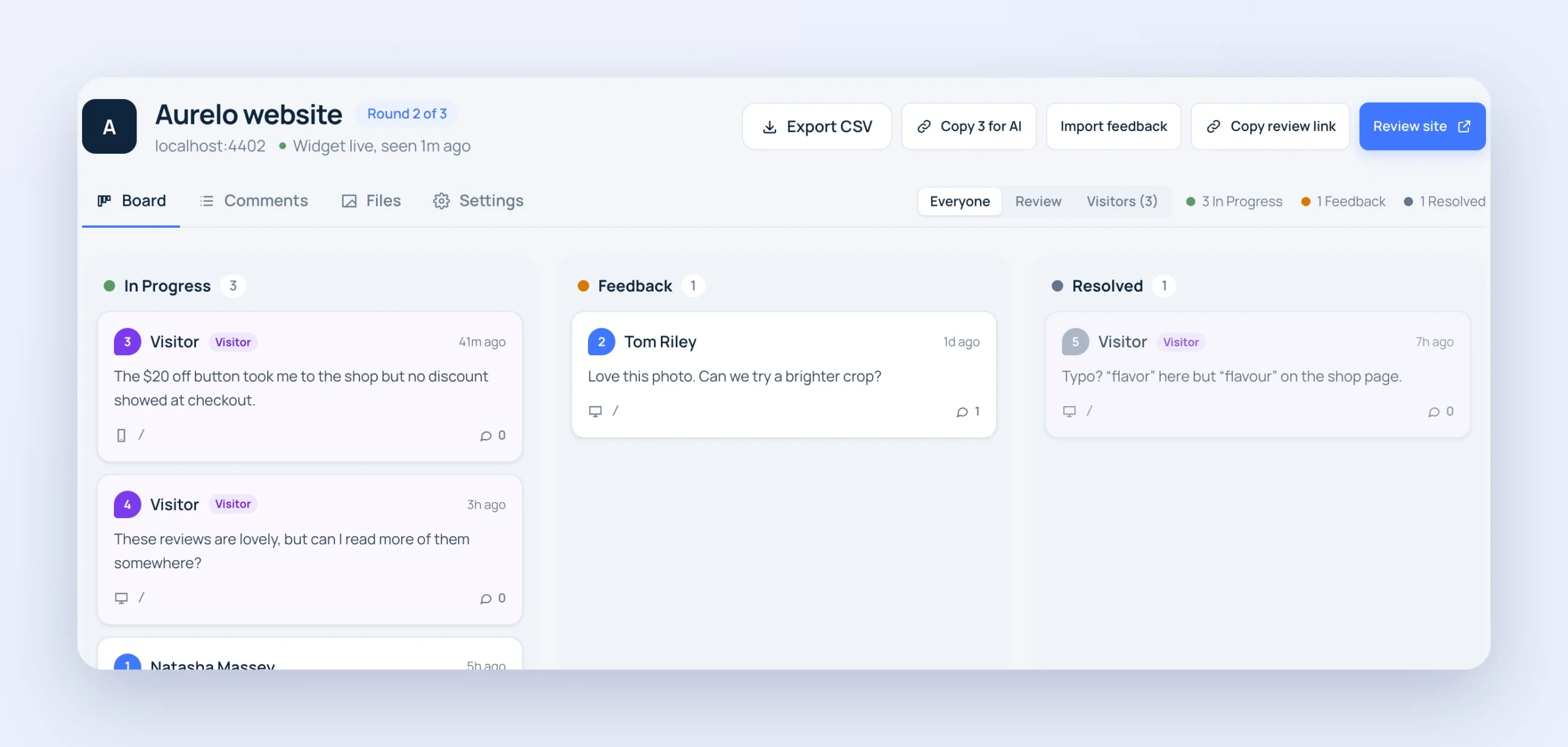
The Drobber project board with visitor comments in purple, marked Visitor, beside client comments, and an Everyone, Review and Visitors filter

The Feedback tab

A tab on the site.
In your colours.

Every visitor sees a Feedback tab on the edge of the page. Choose one of seven colours or any colour you like, and the text stays readable on it. A small “Feedback by Drobber” line sits at the bottom of the form, and you can hide it on a paid plan.

  • Seven colours to pick from, or any colour
  • Previewed in Settings before you save
  • Hide the Drobber credit on a paid plan
Seven tab colours and a custom colour. The Feedback tab on the edge of a website changes to match the colour you pick, and cycles through the colours when you are not hovering.NavyBlueBlackGreenPurpleRedOrangeAny colour you likeFeedback

For visitors

Give your users a voice
to say what is wrong.

Visitors click a spot, drag over an area or highlight some text, then choose Feedback, Something’s broken or Question. They can draw on the page, attach a screenshot and leave an email if they’d like a reply. There’s no account, no panel and nothing anyone else has said.

For your team

Kept apart from
client reviews.

Visitor feedback is always purple, with a Visitor label, on the board, the comment list, the inbox and the pins on the site, so it’s never mistaken for a client’s review comment. Filter the board by Everyone, Review or Visitors, and only your team ever sees it.

  • Purple, with its own Visitor label
  • Everyone, Review and Visitors filters
  • Clients and other visitors never see it
The Drobber project board with visitor comments in purple, marked Visitor, beside client comments, and an Everyone, Review and Visitors filter

Step by step

How to collect feedback from website visitors

It takes a minute to switch on, on any site that already has Drobber.

  1. 01

    Add Drobber to the site

    Paste the snippet into the site once, or install the WordPress plugin.

  2. 02

    Switch on visitor feedback

    In the project’s Settings, turn on Visitor feedback and choose the tab’s colour.

  3. 03

    Visitors leave feedback

    Everyone using the site sees the Feedback tab. They point at the spot, write a note and send it.

  4. 04

    Pick it up with your team

    It arrives marked Visitor, with the page, browser and device, and goes to your connected tools like any other comment.

Team only

Clients never see visitor feedback, in the widget, the dashboard, the inbox or digests.

Reply by email

Visitors can leave an email, so you can let them know when it’s fixed.

In your usual flow

Visitor comments reach the bell, Slack, Jira and your other connected tools like any other comment.

Kept clean

Feedback is only accepted from the project’s own site, with limits per visitor and a trap that only bots fall into.

Exact context

Every note comes with the page, the element, the browser, the operating system and the screen size.

Your colour

Match the tab to the site, from seven colours or any colour you choose.

Hear from the people using your site.

Start your 14-day free trial and switch on visitor feedback for your next launch.

Start free

30-day money-back guarantee

Secret Link